Write it into your app
Everything the command line did, your app does with a client: JavaScript or TypeScript on Node.js 20 or later, or Python 3.10 or later. Both are generated from the same schema and use the same words: offer, connections, request, result, wait; issue, give; owned, owns. Requests are built with ask.*, and what an offer asks for with grant.*.
Your app needs a server side, even a small one, because the account's secret must never reach a browser page. The starter is one server file, and a page.
This page has the whole of an app, twice: the same program in JavaScript and in Python. Each makes an offer, waits for a wallet to connect to it, takes a payment, gives the player 100 gems of its own coin, and signs the player in. Copy either one whole. Both ran, as written, against an account on the beta network, and their output is below them.
The whole program, in JavaScript
One file, my-game.mjs. Save it in your app's folder, where the TypeScript client is installed (the account page):
// SPDX-License-Identifier: MIT OR Apache-2.0
//
// My Game, plugged into DSM, in one file: a connect code, a wallet that
// connects to it, a payment, gems handed over, and a sign-in. It talks to the
// account `make app-dev` runs.
//
//   npm install
//   node my-game.mjs

import { ask, grant, localAccount } from "dsm-app-client";

const app = await localAccount("app");

// The wallets connected before this run, so the one that connects now stands out.
const before = new Set((await app.connections()).map((c) => c.id));

// 1. The offer: what My Game may do without asking the player again.
const offer = await app.offer({
  name: "My Game",
  grants: [grant.send("ERA", "0.10", "1.00"), grant.owns(["ERA"]), grant.accept()],
});
console.log(`connect code: ${offer.code}`);
console.log("waiting for a wallet to connect to it...");

// 2. A wallet connects: scanned on a phone, or `make dev-wallet-connect CODE=...`.
let player;
for (;;) {
  player = (await app.connections()).find((c) => c.connected && !before.has(c.id));
  if (player !== undefined) break;
  await new Promise((resolve) => setTimeout(resolve, 1000));
}
console.log(`wallet ${player.peer} connected`);

// 3. 0.05 ERA, inside the grant, so the player is not asked again.
const paid = await app.wait(await app.request(player, ask.send("ERA", "0.05", "100 gems")));
console.log(`payment: outcome ${paid.outcome}, fact ${paid.fact}`);
if (paid.fact !== "received") process.exit(1);

// 4. Your own coin. Issuing it again with the same terms answers with the
//    same coin, so this runs again and again. The wallet accepts it, then
//    your account gives.
const gems = await app.issue({ symbol: "GEMS", name: "Gems", supply: "1000000" });
await app.wait(await app.request(player, ask.accept(gems)), { until: "answered" });
await app.give(player, gems, "100");
console.log(`gave 100 ${gems.symbol}`);

// 5. A sign-in. It always waits for the player to approve it on the device.
console.log("sign-in asked: approve it on the device");
const login = await app.wait(await app.request(player, ask.login("My Game")));
console.log(`sign-in: outcome ${login.outcome}, fact ${login.fact}`);
if (login.fact === "signed") console.log(`signed: ${login.signed.statement}`);
It is plain JavaScript, so node runs it with no build step, and it is valid TypeScript too. With dsm-app up running:
node my-game.mjs
(From the repo, it is in guide/examples/my-game, whose package.json depends on the client in the clone: npm install, then the same node my-game.mjs.)
It prints a connect code and waits. In a second terminal, connect a wallet to it: dsm-dev-wallet connect followed by the code, or scan it on a phone. (A wallet connects to an app once: if the terminal wallet is still connected from the earlier pages, dsm-dev-wallet disconnect $S first, or connect a second one with DSM_WALLET_NAME=wallet2 dsm-dev-wallet up, then DSM_WALLET_NAME=wallet2 dsm-dev-wallet connect <the code>.) When the program asks for the sign-in, approve it as on the last page: dsm-dev-wallet pending shows the connection and the request's number, and dsm-dev-wallet approve <connection> <number> approves it.
What it printed:
connect code: dsm:connect/v1:18B6GX3ME1SKMBSF64S3EBHG5RR2WC9T70T38CRJ41QXQJEH1V239MWMG2Q6RPQ5SJ4RD3XP78QK4KMD5G86Z5SCMB2MY6H0B03M69RKFDWBCDNTWZR7KEK2HJ0Y9JYVD945TPAJW7719A4HNYWG
waiting for a wallet to connect to it...
wallet EKJMVVEGD8KFQNP2DP8XJ0QFNSZTV5V7MHZKQZ0N7097WPG8ZPV0 connected
payment: outcome carried_out, fact received
gave 100 GEMS
sign-in asked: approve it on the device
sign-in: outcome carried_out, fact signed
signed: Sign in to My Game (a45c78b0-3774-466d-aee8-98cbdf2b9b49)
The wallet then owned the 100 GEMS:
ERA                 98.95   currency NNG176RZ6ACTWCDPRNYHXZK2DCZ72SPA9Q6XWGRGQ9JGKZYTESG0
GEMS                  100   currency 4K53KPP5HCKG2NK0CRM8H888R3YYT7ACQ00BB7S6C5VVEQFNR670
dBTC           0.00000000   currency 0EJ2PSRS2YQR8BR77P3WZ92SV12VJT7XP6NWP0SH5P8MWD81C8H0
The same program, in Python
my_game.py. Save it in your app's folder too:
#!/usr/bin/env python3
# SPDX-License-Identifier: MIT OR Apache-2.0
"""My Game, plugged into DSM, in one file: a connect code, a wallet that
connects to it, a payment, gems handed over, and a sign-in. It talks to the
account `make app-dev` runs.

    python3 guide/examples/my_game.py
"""

import sys
import time

from dsm_app_client import ask, grant, local_app


def main() -> int:
    app = local_app()

    # The wallets connected before this run, so the one that connects now stands out.
    before = {c.id for c in app.connections()}

    # 1. The offer: what My Game may do without asking the player again.
    offer = app.offer("My Game", [grant.send("ERA", "0.10", "1.00"), grant.owns(["ERA"]), grant.accept()])
    print(f"connect code: {offer.code}", flush=True)
    print("waiting for a wallet to connect to it...", flush=True)

    # 2. A wallet connects: scanned on a phone, or `make dev-wallet-connect CODE=...`.
    while True:
        new = [c for c in app.connections() if c.connected and c.id not in before]
        if new:
            player = new[0]
            break
        time.sleep(1)
    print(f"wallet {player.peer} connected", flush=True)

    # 3. 0.05 ERA, inside the grant, so the player is not asked again.
    paid = app.wait(app.request(player, ask.send("ERA", "0.05", "100 gems")))
    print(f"payment: outcome {paid.outcome}, fact {paid.fact}", flush=True)
    if paid.fact != "received":
        return 1

    # 4. Your own coin. Issuing it again with the same terms answers with the
    #    same coin, so this runs again and again. The wallet accepts it, then
    #    your account gives.
    gems = app.issue("GEMS", "Gems", "1000000")
    app.wait(app.request(player, ask.accept(gems)), until="answered")
    app.give(player, gems, "100")
    print(f"gave 100 {gems.symbol}", flush=True)

    # 5. A sign-in. It always waits for the player to approve it on the device.
    print("sign-in asked: approve it on the device", flush=True)
    login = app.wait(app.request(player, ask.login("My Game")))
    print(f"sign-in: outcome {login.outcome}, fact {login.fact}", flush=True)
    if login.fact == "signed" and login.signed is not None:
        print(f"signed: {login.signed[0]}", flush=True)
    return 0


if __name__ == "__main__":
    sys.exit(main())
With the Python client in the virtual environment from the account page:
. .venv/bin/activate
python3 my_game.py
Connect a wallet to the code it prints, and approve the sign-in, as above. What it printed:
connect code: dsm:connect/v1:18B6GX3ME1SKMBSF64S3EBHG5RR2WC9T70T38CRJ41QXQJEH1V239MWMG2Q6RPQ5SJ4RD3XP78QK4KMD5G86Z5SCMB2MY6H0V8KS5P8628JH2QR3BJ8Y97KTTFCQPFZ9NYH3AQN6PQZZP8XKEANG
waiting for a wallet to connect to it...
wallet HA62NJZ06ZY8C79HKM39AGTC3CMX9348RJH30GZTHA00BCSP0KV0 connected
payment: outcome carried_out, fact received
gave 100 GEMS
sign-in asked: approve it on the device
sign-in: outcome carried_out, fact signed
signed: Sign in to My Game (ef80f587-b7e4-4041-9088-d2b554da1071)
This run came after the JavaScript one, on the same account: issuing GEMS a second time answered with the same coin, and the account gave from what it still held.
Your account at a glance
The install put two more Python programs in ~/.local/share/dsm/examples: first_payment.py, a connect code and one payment received (the newcomer check, make first-run, runs it on a clean Ubuntu), and account_status.py:
#!/usr/bin/env python3
# SPDX-License-Identifier: MIT OR Apache-2.0
"""Your application's account at a glance: its identity, what it owns, every
connected wallet, and the latest activity. Runs against `dsm-app up` (from the repo, `make app-dev`)."""

from dsm_app_client import local_app


def main() -> None:
    app = local_app()
    print(f"account {app.id()}")
    for o in app.owned():
        print(f"  {o.object.symbol:<8} {o.display:>16}   {o.object.kind}")
    connections = app.connections()
    print(f"{len(connections)} connection(s) with wallets")
    for c in connections:
        state = "connected" if c.connected else "disconnected"
        print(f"  connection {c.id}  wallet {c.peer}  {state}")
        for line in c.grants:
            print(f"    may: {line}")
    for e in app.ingress.activity(0).entries[-5:]:
        print(f"  {e.seq}  {e.name}  {e.summary}")


if __name__ == "__main__":
    main()
python3 ~/.local/share/dsm/examples/account_status.py
On the account from these pages, it began:
account 0RHS9YDRSPR9PG9WESBX7PMGAVMEJSSVSC11QSD4NG4JPKY3XQ80
  ERA                 60.60   currency
  GEMS               999800   currency
  GOLD            999000.00   currency
  SHIELD                  0   unique
  dBTC           0.00000000   currency
6 connection(s) with wallets
  connection 46E4R16XC06YC0YBK8H4P5EWCQ2J22Q4B1A4N16E4BA3J6WWN0Q0  wallet HA62NJZ06ZY8C79HKM39AGTC3CMX9348RJH30GZTHA00BCSP0KV0  disconnected
    may: Send this app: up to 0.10 ERA a time, 1.00 ERA in all
    may: Prove what you own of ERA and of objects this app issued
    may: Receive objects this app issues
    may: Lock stakes for matches: up to 1.00 ERA a time, 2.00 ERA in all
and went on with every other connection, and the latest activity.
Every piece, in either language
On the starter's page, the switch at the top shows every piece's code in Python instead of TypeScript. Here are the offer and the sign-in:
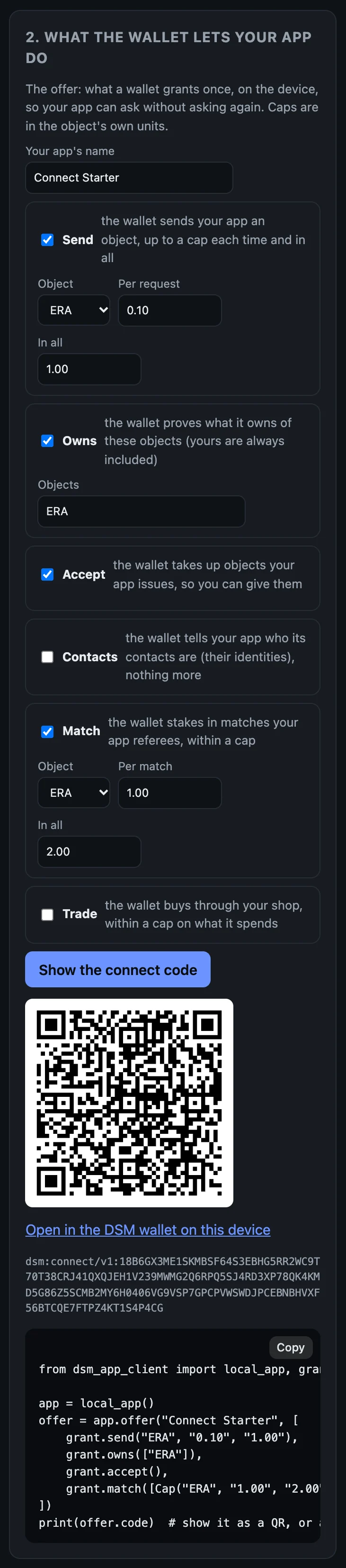
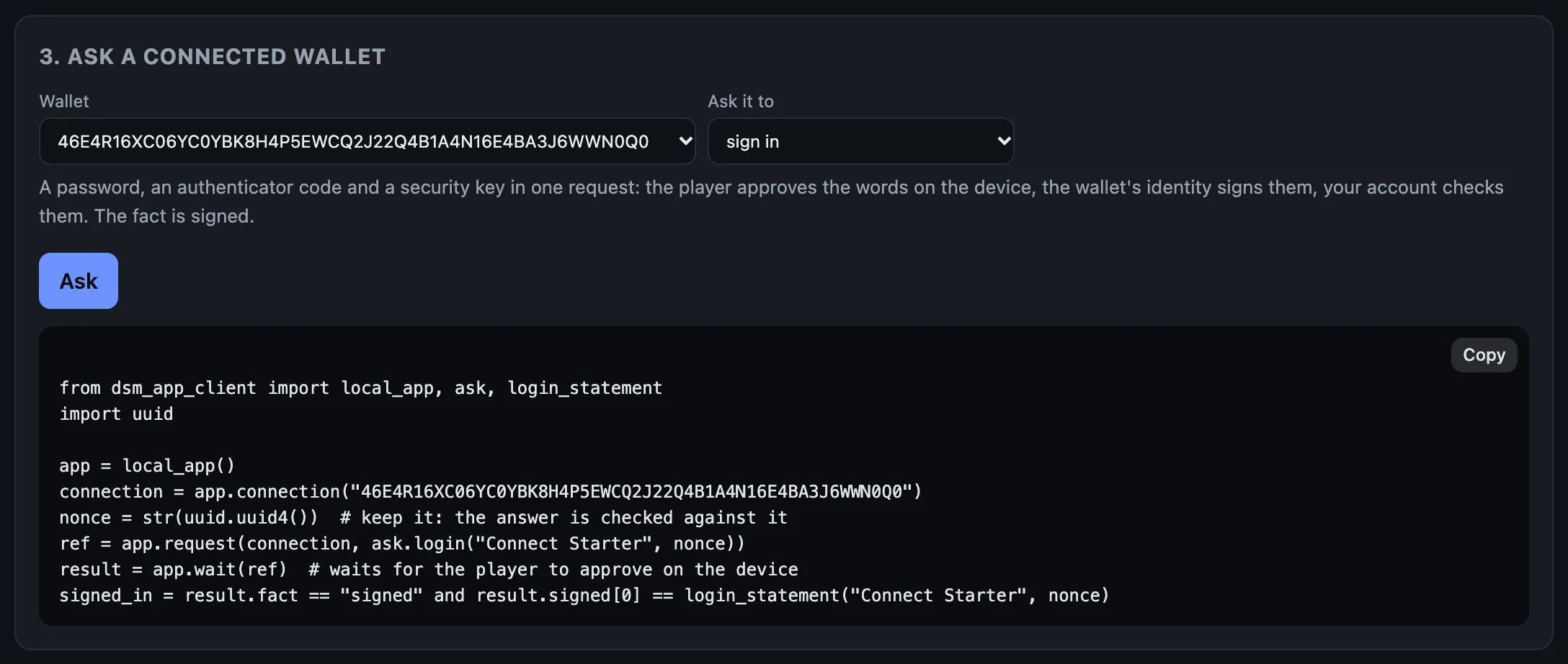
login_statement.In your own app
JavaScript or TypeScript. npm install the client's package (~/.local/share/dsm/clients/dsm-app-client-0.1.0-beta.4.tgz) into your app, as the account page did; its types are inside it, so nothing is compiled. localAccount("app") finds the account dsm-app up runs by looking for the .dsm-dev folder above the folder you run in. From anywhere else, name it: DSM_DEV_DIR=/path/to/your/app/.dsm-dev. On a server of your own, open the account from the ingress's address and the secret file the host writes: new AppAccount(await Ingress.fromSecretFile(url, secretFile)).
Python. pip install the client's wheel (~/.local/share/dsm/clients/dsm_app_client-0.1.0b4-py3-none-any.whl) into your app's virtual environment. local_app() finds the account the same way, and DSM_DEV_DIR names it from anywhere else. On a server of your own: AppAccount(Ingress.from_secret_file(url, secret_file)).
From a clone of the repo, the clients are clients/typescript (depend on it by path) and clients/python (pip install -e clients/python); both carry their generated types, so neither needs protoc.
Any other language
Generate types from proto/dsm_app.proto, and send an IngressRequest (a RouterInvokeOp or RouterQueryOp: the route's name and an ArgPack holding its request message) to POST /ingress. An IngressResponse comes back: either an error, or 0x03 followed by an Envelope. clients/typescript/src/ingress.ts is the whole exchange, in one short file. The routes are in the reference.
Objects
Everything an account can hold is an object: ERA, a sword, a ticket, a coin you issued. A currency is an object counted in units; an item is an object of which exactly one exists. You name an object by its symbol ("ERA", "GEMS") or by its id, and amounts in its own units ("0.10", "100"); your account converts them, in both directions, so no client carries the unit rule. issue makes a new object, and your account then holds its whole supply. Issued again with the same terms, it answers with the same object. give hands some to a wallet that has accepted it.
Next, when you want it: Shops, matches and contacts.